
High-Speed Offline Wedding Photo Selection System

Patent Pending – 202521102243

High-Speed Offline Wedding Photo Selection System

Patent Pending – 202521102243
🛡️ Patent-Pending Technology – Indian Patent Application No. 202521102243
✨ Offline Wedding Photo Selection Software
Founder – WPS AI Gallery
Founder & Inventor — WPS AI Gallery

Validation Registry: 90+ Technology Validators

Technology validators (not buyers). Evidence is timestamped and hash-sealed.

Control How Clients View & Select Wedding Photos

Patent-pending offline gallery system for fast, focused selection

Create a compressed offline gallery that your clients can open on Windows or Android and calmly shortlist their favourite photos – even in low or no internet areas.

Processing time: Depends on PC performance, photo resolution and quantity.
All technical values on this website are recorded from real test runs, not estimates.
AI‑assisted compression engine tuned specially for offline galleries

📊
-
Photos
System Recorded
💾
-
Output Size
MB (Real)
-
Processing Time
Seconds (Real)
📴
-
Offline Mode
System Verified
0
Technology Validators (not buyers)
System Recorded
0
Galleries Created
Evidence Logged
0
Validator Regions (coarse)
Anonymized Logs

Why an Offline Wedding Photo Selection System?

Many Indian weddings happen in places where internet is weak or unstable. WPS AI Gallery is built as an offline-first system so that selection can continue smoothly, even when the network does not.

📴

No Internet Dependency

Client को सिर्फ एक बार gallery file भेजनी है. उसके बाद पूरा selection process offline चलता है – बिना website load हुए, बिना buffering, बिना data tension.

👨‍👩‍👧‍👦

Family-Friendly Review Experience

पूरा family एक साथ बैठकर आराम से photos देख सकता है, zoom कर सकता है, favourite mark कर सकता है – बिना WhatsApp पर बार‑बार forward / download किये.

🔒

Privacy & Data Control

Original high‑resolution photos studio के computer पर ही रहते हैं. Client सिर्फ compressed offline gallery और selection layer के साथ काम करता है – कोई cloud upload जरूरी नहीं.

Fast, Lightweight Selection

सैकड़ों / हज़ारों photos को एक छोटी, fast‑loading offline gallery में बदल दिया जाता है. Client जल्दी scroll कर सकता है, star/tag कर सकता है और साफ‑साफ selection file वापस भेज सकता है.

WPS AI Gallery – Version 6.0 Latest Features

See first – All new Version 6.0 features

Ultra Fast Photo Engine

About 1100 photos load in approximately 1 second (tested performance).

⚙️

Smart Project Setup Menu

Easy system to set Studio Name, Client Name, Studio Logo (PNG), Branding Lock and Gallery Expiry.

📁

Multi Folder Photo Support

Load multiple folders together (Haldi, Mehndi, Wedding, Reception). Canon, Sony and Nikon camera photo support.

🚀

Fast Offline Gallery Generation

1100 DSLR / Mirrorless photos offline gallery generates in approximately 1 minute 15 seconds (tested on Ryzen 5 5600, 16GB RAM). Speed may vary based on computer.

📤

Easy Client Gallery Sharing

Full gallery of 1100 photos (~63.6 MB) can be shared via WhatsApp or Email.

📴

Internet Free Viewing

Once the client downloads the gallery, it runs smoothly without internet, without SIM card, and even in Airplane Mode.

📱

Simple Mobile Gallery Interface

In mobile browser (Google Chrome), Studio Branding, Folder Summary and Photo Count display as soon as the gallery opens.

Easy Photo Selection System

Client can select favourite photos by clicking the box on each photo. Selected Counter below shows the count of selected photos.

🔍

Photo Zoom & Navigation

Client can zoom in to view photos larger and navigate Left-Right to change photos.

Smart Guest Tagging System

Client can add Guest Tags (Mama, Bhai, Behan, Dost, VIP Guest or Custom Name) by clicking Star on photos. Album Designer instantly knows which photos are important.

↕️

Fast Gallery Scroll Navigation

Right side Up / Down buttons scroll the gallery quickly. About 100 photos scroll per click; hold to scroll 1100 photos in ~3 seconds (tested).

📋

Quick Selection Data Export

On client Submit, a small selection file is created. When studio opens it in software, selected photos (e.g. 300 of 1100) are ready in "Selection Final Data" folder in about 1 minute.

🔒

Secure Local Data System

All original photo data stays on the studio's computer. Client can only view and select photos; no real data is uploaded anywhere.

Pehle live demo, phir decision — bilkul bina pressure

Neeche ek real workflow dikhaaya gaya hai: client khud poora flow karta hai, taaki trust clear ho. Upar wala card offline selection ka visual concept hai.

From Studio PC to Client & Back

  1. Studio: Creates offline gallery (1100 photos, 3 folders) on Windows with WPS AI Gallery.
  2. Share: Sends compressed gallery file (~63.6 MB) via WhatsApp / Email / Drive.
  3. Client: Opens gallery in Chrome, scrolls, zooms, tags guests and selects favourites offline.
  4. Submit: Client generates a tiny selection file and sends it back to the studio.
  5. Studio: Software loads selection file and prepares a “Selection Final Data” folder automatically.

This live demo is a visual concept of the real offline workflow – performance and timing are based on tested runs.

Hum kaise real demo karte hain (AnyDesk + voice call)

Meta ads se ho ya local contact — jab koi photographer connect karta hai, aksar mind mein yeh hota hai: kaheen dhokha na ho jaye, paisa waste na ho jaye. Isliye hum pehle full live demo karte hain. Main software “sell” karne ke liye nahi aata — photographer ka real pain solve dikhane ke liye aata hoon.

  1. AnyDesk: Aapko mere PC ka AnyDesk number milta hai; aap remote se connect karte ho. Saath mein voice call par main training deta hoon.
  2. Gallery: Aap khud gallery banate ho — main sirf guide karta hoon; poora flow practically aapke haath mein hota hai.
  3. Mobile tak: Wahi gallery PC se aapke mobile par bheji jaati hai.
  4. Client side: Aap mobile par gallery open karke select karte ho, final submit karte ho, aur jo selection file banti hai woh meri WhatsApp par bhej dete ho — taaki end-to-end process real lage.
  5. Studio side: Phir aap wapas screen par aa kar 1 click mein data bahar nikalte ho (export).
  6. Point: Yeh poora aap khud karte ho, taaki clearly feel ho: yeh technology actually time bachati hai.

Agar demo ke baad bhi aapko lagta hai ki yeh aapke workflow ke liye sahi hai, tabhi activation / aage ki steps start hoti hain. Koi jabardasti nahi — kyunki focus software bechna nahi, photographer ka workflow smooth karna hai.

What is WPS AI Gallery?

WPS AI Gallery is a patent-pending offline gallery system for controlled viewing and selection of wedding photos. Recipients receive an offline photo gallery that works on Windows 10, Windows 11 and Android phones via Chrome or Firefox browser, allowing viewing and selection after receiving the gallery—no internet required for browsing/selection.

It is designed to support privacy-aware workflows: offline-controlled viewing, studio-side control, and selection-only access.

Validation Signals (Non-Endorsement)

🏢
0
Technology Validators (not buyers)

Count is derived from timestamped, hash-sealed validation records (anonymized).

💒
Logged
Processing Runs

System-recorded generation runs with technical metrics (counts, sizes, timing) for evidence review.

📴
Works Offline After Delivery

Works offline after the gallery is delivered. Internet is required only to send the gallery file.

🛡️
Patent Pending Technology

Patent-Pending Technology – Indian Patent Application No. 202521102243

Typical Workflow (High-Level)

📷

Create Gallery

Prepare your wedding photos in the gallery format

📤

Share with Recipient

Send the gallery via the preferred delivery method

📱

Recipient Reviews

Recipient browses and selects on Android via Chrome or Firefox browser, offline

Receive Selections

Get a clear list of selected photos for printing or delivery

Who is WPS AI Gallery For?

Designed specially for Indian wedding workflows where internet is not always stable and fast. Different users, one offline selection system.

📷

Wedding Photographers & Studios

  • Send one small offline gallery instead of hundreds of heavy photos.
  • Client खुद घर बैठे calmly shortlist कर सकता है – बिना बार‑बार calls के.
  • Clear selection file वापस मिलती है (no confusion, no “yeh wala kaunsa?”).
🎨

Album Designers

  • Ready‑to‑use “Selection Final Data” folder – सिर्फ चुने हुए photos साथ में.
  • Guest tags (Mama, Bhai, VIP, आदि) से तुरंत पता चलता है कौनसे photos important हैं.
  • कम समय में clean layout planning possible.
🖨️

Printing Labs & Partners

  • Client से मिलने वाला final selection already organized होता है.
  • Order में “kitne photos, kis guest ke” जैसी clarity रहती है.
  • Re‑prints और album orders में कम गलती, कम back‑and‑forth.
📶

Low‑Internet / Village Weddings

  • Gallery एक बार WhatsApp / Drive से भेज दीजिए – आगे पूरा काम offline.
  • Client airplane mode में भी आराम से photos देख सकता है.
  • No heavy uploads, no waiting for slow websites to load.

Intended Outcomes

📸

For Photographers

  • Reduce storage and data transfer costs
  • Structured selection-only workflow
  • No monthly subscription fees
  • Professional branded presentation
  • Consistent delivery format
  • Streamlined workflow
👥

For Recipients

  • No internet connection required after receiving the gallery
  • Works on Android phones via Chrome or Firefox browser
  • Optimized loading and smooth scrolling
  • Intuitive photo selection interface
  • Privacy-focused offline experience
  • Recipients can browse and select photos offline after receiving the gallery
🖨️

For Printing Labs

  • Receive organized selection lists
  • Clear, unambiguous orders
  • Optimized processing workflow
  • Reduced errors and confusion
  • Clearer handoff communication

Online Selection Tools vs WPS AI Gallery

Online Selection Tools

WPS AI Gallery

Offline Option
Internet Required
❌ Yes
✅ Works offline after delivery
File Size
📤 Large uploads
📦 Small gallery
Loading Speed
🐌 Slow loading
⚡ Optimized scroll
Privacy & Security
☁️ Cloud risk
🔒 Private offline

Everything You Need

📸

High-Quality Photos

Designed for wedding photo selection with high-quality thumbnails and smooth browsing

📴

Works Offline After Delivery

Works offline after the gallery is delivered. Internet is required only to send the gallery file. Full functionality on Windows 10, Windows 11 and Android phones via Chrome or Firefox browser

📱

Android Optimized

Optimized viewing experience on Android phones via Chrome or Firefox browser

Performance Optimized

Optimized loading and smooth scrolling (performance depends on device and photo set)

🔒

Secure & Private

Password protection, expiry control, privacy-focused data handling

🎨

Custom Branding

Personalize galleries with your studio branding and watermark

💾

Easy Sharing

Share the gallery file via common transfer methods (including WhatsApp where applicable)

🔄

Large Gallery Support

Handles large photo galleries smoothly with optimized browsing experience

🎯

Smart Selection

Intuitive interface with progress tracking and selection management

Choose the Right WPS AI Gallery Plan

Offline wedding gallery software designed for studios, photographers and printing partners who want a clear, professional selection workflow.

WPSAIGallery v3.1.0 Basic Plan Preview

BASIC PLAN – WPSAIGallery v3.1.0

Ideal for studios who want to start with a simple, reliable offline gallery and manual selection system.

₹1499

₹1999 → ₹1499 / 12 Months

  • Unlimited offline galleries for your wedding and event projects
  • Supports large photo counts per gallery (device‑dependent)
  • Offline HTML gallery generation for Windows
  • Client viewing on Google Chrome browser (Android & desktop)
  • Manual photo selection system with clear shortlist
  • No internet required after the gallery file is delivered
  • Best suited for small & medium studios starting with offline selection

Technology Status: WPSAIGallery – Patent Pending Technology
Indian Patent Application No: 202521102243

Official Website: www.wpsaigallary.com

Get WPS AI Gallery Software

💻

Windows Desktop Application

Professional desktop software for creating and managing offline photo galleries

Version: v3.1.0
Application Size: ~70 MB
OS: Windows 10 & Windows 11

Activation required • Offline, license-based software

📖

Documentation & Guides

Complete user manual, video tutorials, and setup guides

Advanced Features & Specifications

Performance

  • ✅ 60fps smooth scrolling
  • ✅ Optimized for large galleries with AI compression
  • ✅ Efficient memory usage
  • ✅ Smooth performance

Security

  • ✅ Password protection
  • ✅ License-based time-limited access
  • ✅ No data collection

Compatibility

  • ✅ Works on Android phones
  • ✅ Chrome & Firefox browsers
  • ✅ Windows 10 & Windows 11 desktop
  • ✅ Low-end Android devices (2GB RAM)
  • ✅ No app installation needed

Professional Desktop Application

WPS AI Gallery - Create Gallery
📁 Project Management
📸 Photo Selection
🎨 Custom Branding
💾 Export Gallery

Powerful Desktop Software

Create offline photo galleries with a Windows 10 & Windows 11 application. Setup steps depend on device and workflow.

  • ✅ Drag & drop photo organization
  • ✅ Batch processing for multiple projects
  • ✅ Custom watermark and branding
  • ✅ Password protection setup
  • ✅ One-click gallery generation
  • ✅ Export to USB/Drive

Evidence Overview (Non-Endorsement)

0
Technology Validators
India
Origin (Project)
Patent Pending

Counts shown on this page refer to validation records (technology validators, not buyers). No endorsement is implied.

Validator Notes (Anonymized)

These are anonymized comments from real technology validators (studios & professionals) who tested WPS AI Gallery in real wedding workflows.

"Offline browsing/selection reduced dependency on network availability during review."

— Validator (anonymized)

"Selections were easier to consolidate because the output list was structured."

— Validator (anonymized)

"Security controls and evidence logging were useful for internal audit and verification."

— Validator (anonymized)

"Low internet वाले area में भी client ने आराम से घर से ही पूरी selection कर दी."

— Studio Validator (India, state anonymized)

"Selection file import होते ही सिर्फ चुने हुए photos अलग folder में आ गए – album design बहुत fast हो गया."

— Album Designer (anonymized)

View Detailed Client Reviews →

Gallery Preview

How Studios & Clients Actually Use It

Case Study: 1100 Photo Wedding

Context: 3 folders (Haldi, Wedding, Reception), DSLR + Mirrorless mix.

  • Offline gallery generated in ~1 min 15 sec (Ryzen 5 5600, 16GB RAM).
  • Final gallery size around ~63.6 MB for 1100 photos.
  • Client reviewed & selected fully offline on Android Chrome.
  • Studio received clean selection file and auto-created “Selection Final Data” folder.

Case Study: Low-Internet Region

Context: Destination wedding with weak mobile network.

  • Gallery delivered once via WhatsApp when network was available.
  • Family reviewed photos later in full offline mode (Airplane Mode supported).
  • No upload of original photos – only compressed gallery + selection file.
  • Reduced back-and-forth calls for “which photos to print?” decisions.

Data Flow Diagram (Offline-Centric)

Studio Computer
Original Photos (DSLR / Mirrorless)
Offline Engine
Offline Gallery File
~63.6 MB • 1100 Photos
Share Once
Client Device
View + Select • No Internet Needed
Selection Only
Selection File
Imported back into WPS AI Gallery

Original high-resolution photos always stay on the studio’s system. Clients work only with the offline gallery and selection layer.

Active States in India

WPS AI Gallery is actively used by real studios across multiple Indian states for offline wedding photo selection.
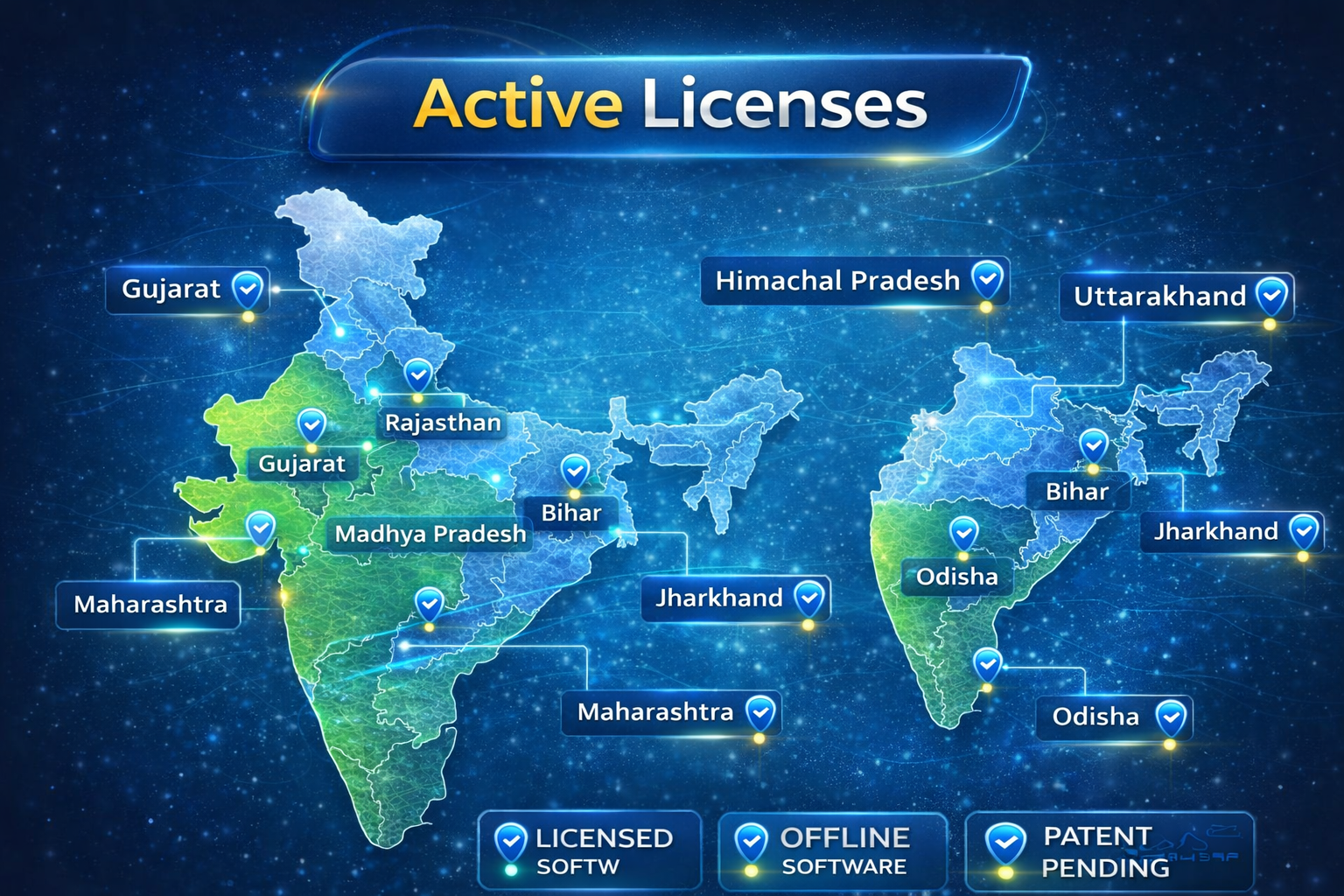
WPS AI Gallery active states in India

India map showing current active WPS AI Gallery states.

Current Active States (Studios)

  • Gujarat
  • Rajasthan
  • Madhya Pradesh
  • Uttarakhand
  • Himachal Pradesh
  • Uttar Pradesh
  • Haryana
  • Maharashtra
  • Bihar
  • Jharkhand
  • Odisha
  • Punjab
  • West Bengal

Photographers across India are rapidly adopting WPS AI Gallery for offline, controlled wedding photo selection workflows.

Workflow Impact (Context-Dependent)

📞

Less Follow-ups

Recipients can review offline, which may reduce avoidable follow-ups depending on workflow.

Impact varies by studio process

Optimized Selection

Structured selection and offline browsing can reduce friction during review.

See system-recorded metrics in evidence logs
🖨️

Clearer Selection Lists

Selection lists can be exported for downstream printing/album workflows.

Selection-only access
🧾

Reduced Ambiguity

Standardized review experience can reduce ambiguity in selection handoff.

Audit-friendly workflow

Watch how WPS AI Gallery works

Short walkthrough video (for information only)

See WPS AI Gallery in Action

Public demos and updates (informational; no endorsement implied).

💬

Join Our WPS AI Community

Connect with other photographers, share experiences, and get updates

Join WhatsApp Group
▶️

Watch Live Demo

See how WPS AI Gallery works with real examples and tutorials

Watch on YouTube
📷

See Real Reels

Short clips showing interface and workflow highlights

View on Instagram
🎬

Reels, Meetings & Reviews

All short videos, meeting demos and client review videos in one place

Watch All Videos →

Quick Questions About WPS AI Gallery

क्या gallery बिना internet चलेगी?

हाँ. Gallery file एक बार client को भेजने के बाद पूरा photo viewing और selection process offline चलता है. Internet सिर्फ gallery भेजने (WhatsApp / Drive / Email) के समय चाहिए.

Client के phone में कोई app install करनी पड़ेगी?

नहीं. Client अपने Android phone पर सिर्फ Chrome या Firefox browser use करके offline gallery open कर सकता है. किसी extra app या play store installation की जरूरत नहीं है.

Original photos कहाँ रहते हैं?

Original high‑resolution photos हमेशा studio के computer पर रहते हैं. Client को सिर्फ compressed offline gallery और selection layer दी जाती है – कोई full‑res cloud upload जरूरी नहीं.

License कितने समय के लिए होता है?

BASIC और PRO plans दोनों अभी 12 months license पर designed हैं. Renewal, support और activation details के लिए WhatsApp support से contact कर सकते हैं.

Share Your Experience

Studios and clients can share real feedback about WPS AI Gallery to help us improve the offline selection experience.

Need Help? We're Here

📧

Email Support

Get help via email

national52141@gmail.com
💬

WhatsApp Support

Quick response on WhatsApp

📚

Documentation

Complete guides and tutorials

View Docs →
🎥

Video Tutorials

Step-by-step video guides

Watch Videos →

Get Started Quickly

🚀

Remote Activation & Onboarding

WPS AI Gallery is designed to provide secure remote activation and onboarding support.

Request a Validation Demo

Validation evidence refers to technology validation usage records (technology validators, not buyers). Evidence references are timestamped and hash-sealed; no sales or endorsement implication is made.

Registry Lock Proof

Early Patent-Pending Users registry snapshot is locked and hash‑sealed for integrity.

Public fields shown here are non-identifying (anonymized IDs and technical hashes) for legal evidence only.

Loading...

Locked at: -

📞

Call / WhatsApp

+91 9601546591

📍

Location

Gujarat, India

🛡️
Indian Patent Pending
202521102243
Patent-Pending Technology – Indian Patent Application No. 202521102243

Disclaimer

WPS AI Gallery is a patent-pending technology (Indian Patent Application No: 202521102243). The software is designed for professional wedding photo selection using offline galleries. Current compatibility includes Windows 10, Windows 11 and Android phones via Chrome or Firefox browser. Features and compatibility may change as the product is updated. All brand names and product names are the property of their respective owners.